DEVLOG 7
I made 3 more tilables for this week, the paper tilable, the drape tilable and also the sand.
Using Substance 3D Painter, I continued utilizing a non-destructive, procedural workflow to create these tileables.
Sand Tileable - To create a realistic shoreline and cave floor, a single flat sand texture wouldn't be enough. The goal was to simulate how different weights of sediment naturally settle together.
- The Base: I started with a fine Lake Bed Sand as the absolute bottom layer, utilizing Tri-planar projection to ensure the physical scale remained accurate across the environment.
- Height Blending: Instead of painting masks, I layered Wavy River Sand and heavier Sandy Riverbed Deposits on top, using Levels - Height adjustments on each. By restricting the height ranges, I forced the heavier deposits to sit naturally in the deeper grooves of the wavy sand
Paper Tileable - The paper tileable required a different approach. It needed to look ancient, tactile, and heavily handled, serving as the base for all the scattered maps and ledgers in the scene.
- Textural Foundation: I combined two distinct paper types: Vietnamese Paper and Top - Paper Parchment Worn to get a rich, fibrous base color and organic grain.
- Procedural Damage: To simulate years of sea air and water damage, I used a standard fill layer driven by an mg_dripping_rust generator mask. This created incredibly natural, uneven staining and discoloration along the fibers of the paper without having to hand-paint water spots.
- Dynamic Tactility: Just like the heavy stone and wood from last week, I topped the paper folder with pass-through MatFX HBAO and Height To Normal filters. Even though paper is thin, generating ambient occlusion and normal data dynamically from the fibrous height details gives the parchment a thick, leathery, and realistic feel under engine lighting.
I ALSO PLACED THESE IN UNREAL ENGINE, HERE IS THE SETUP THAT I MADE
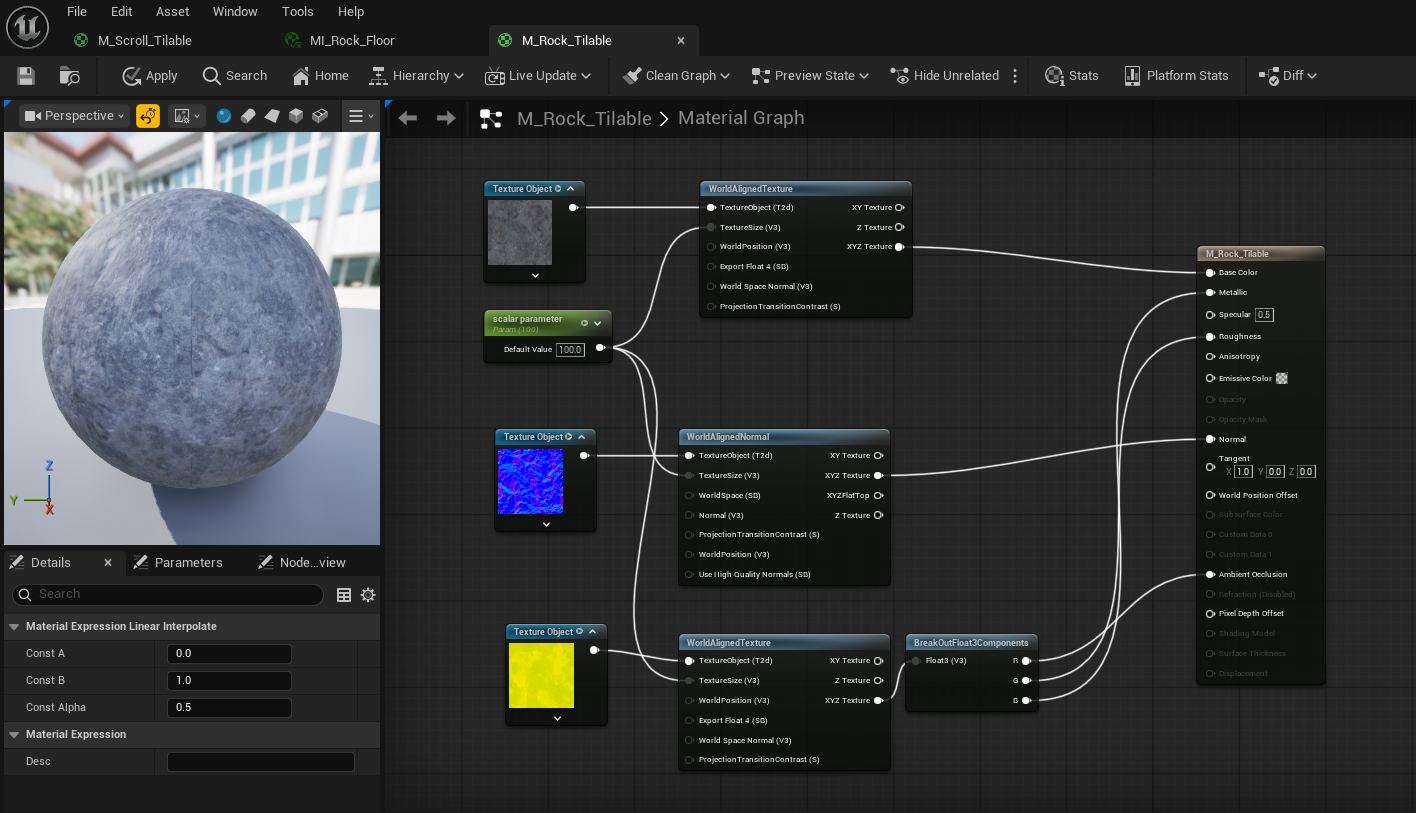
(M_Rock_Tilable)
I used Texture Object nodes plugged into WorldAlignedTexture and WorldAlignedNormal nodes, all driven by a single scalar parameter for scale. For the packed yellow texture, I used a BreakOutFloat3Components node before plugging it into the main material.
Why I did it:
- World Aligned: Rocks are organic, blobby shapes. If I used standard UV mapping, scaling or rotating a rock mesh would stretch and warp the texture. By projecting the texture directly from the world's X, Y, and Z coordinates, I can scale, rotate, and kitbash hundreds of rocks together to build out the pirate cave without ever seeing a texture seam.
- The BreakOut Node: Because World Aligned nodes output all three color channels merged together (XYZ), I needed the BreakOutFloat3Components node to manually split my optimized, packed texture back into its individual Red (Ambient Occlusion), Green (Roughness), and Blue (Metallic) channels.
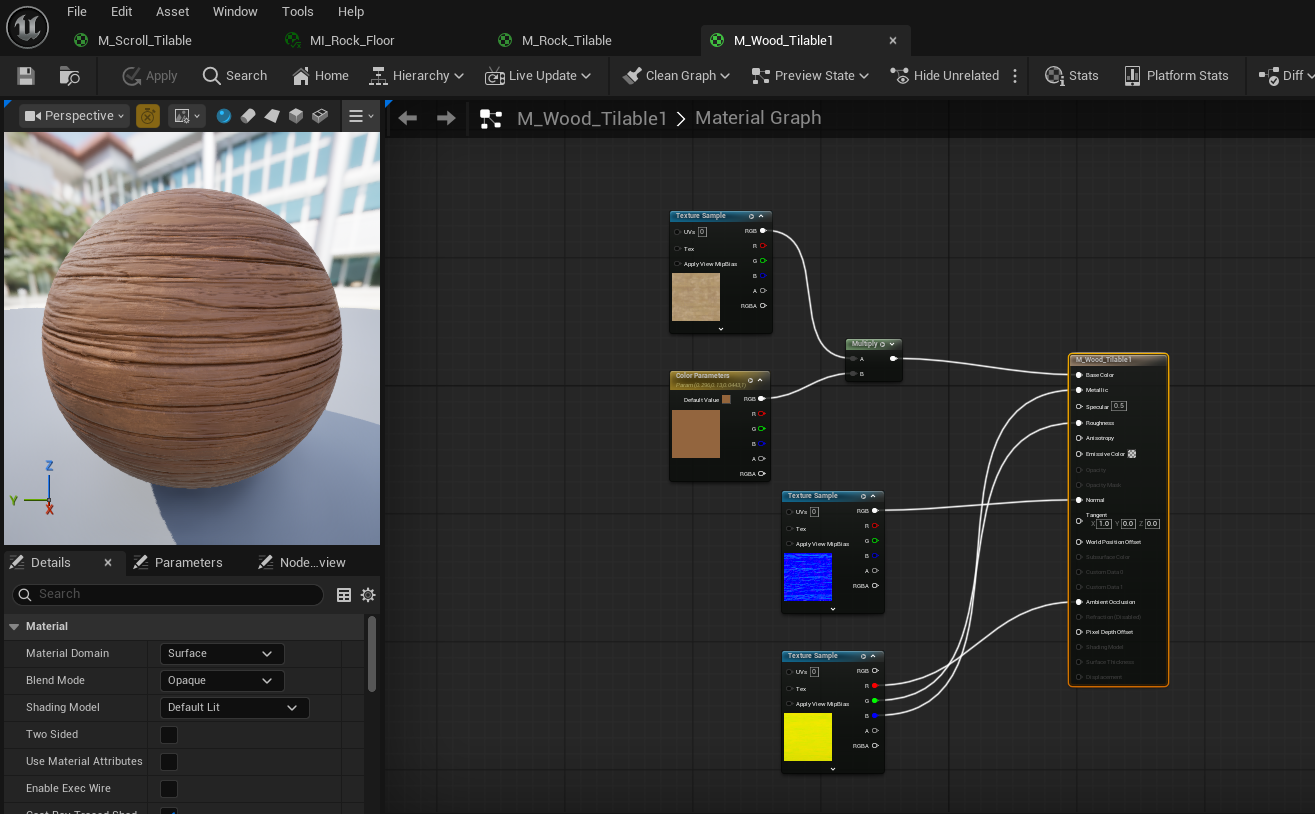
(M_Wood_Tilable1)
What I did
I stepped away from the World Aligned setup here and went back to standard Texture Sample nodes. I also added a Vector Parameter (a color picker) and a Multiply node right before the Base Color.
Why I did it:
- Following the Grain: Unlike organic rocks, wood grain has strict directionality. If I place a wooden plank diagonally on a ship deck, the grain must rotate with the plank. Standard Texture Sample nodes read the model's actual UV map, ensuring the wood grain correctly follows the length of every board.
- Infinite Variations: By multiplying the base wood texture by a Vector Parameter, I created a dynamic tint control. This allows me to use this exact same master material to create bright, sun-bleached planks by changing a color dial in my Material Instances!
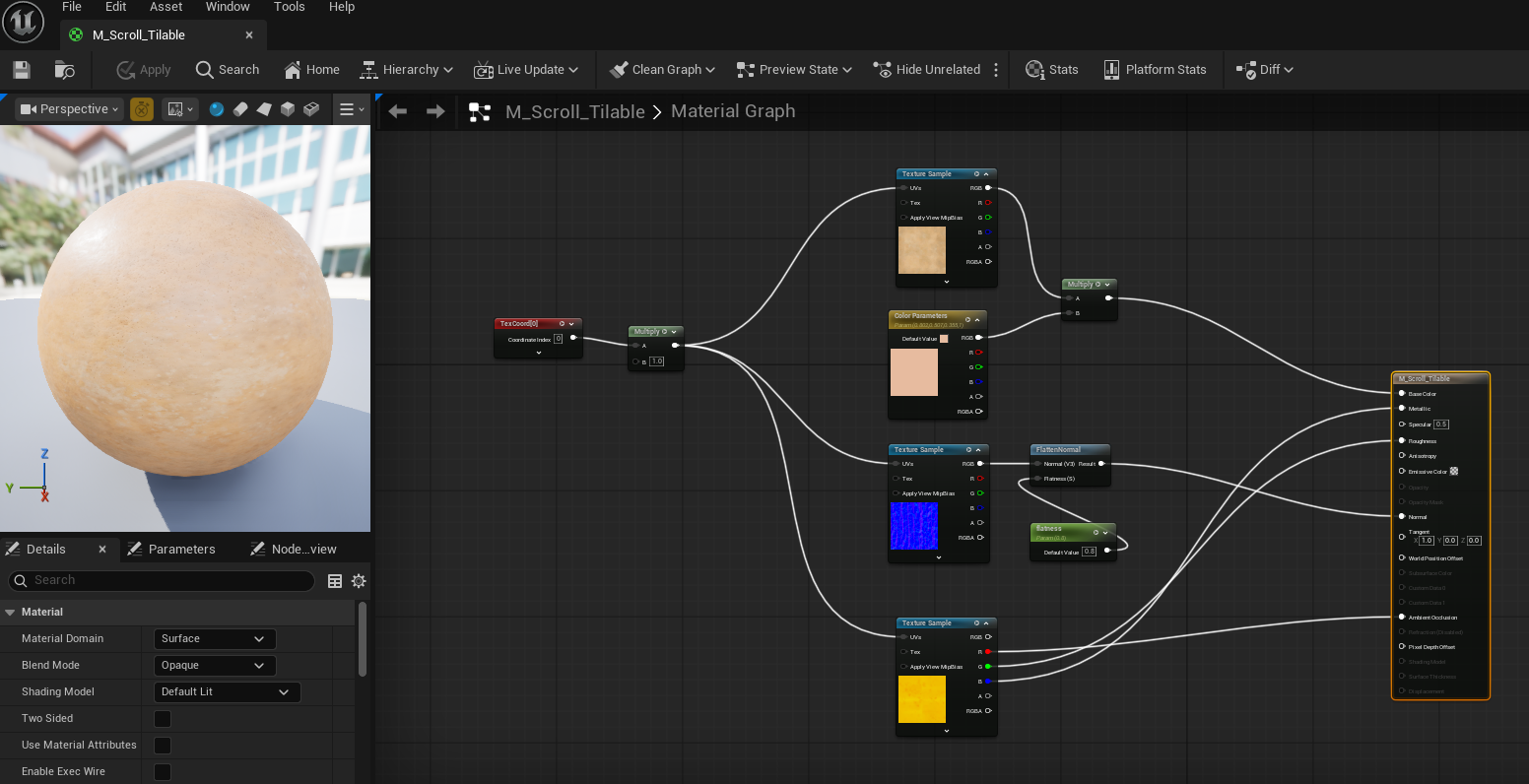
(M_Scroll_Tilable)
What I did
I set up full UV tiling controls using a TexCoord and Multiply node. I added a tint multiplier, and most importantly, I routed the blue normal map through a FlattenNormal node controlled by a scalar parameter.
Why I did it:
- Scaling the Grain: A common issue with paper textures is that at their default scale, they look like thick, noisy leather. My UV tiling setup allows me to scale the grain down, making the fibers look small and realistic for the pirate maps and ledgers scattered around the scene.
Ironing the Paper: Normal maps for paper are notoriously harsh and can cast deep, ugly shadows in the engine. The FlattenNormal node acts as an interactive "iron." By adjusting the flatness parameter in my Material Instances, I can soften the harsh bumps of the bake, ensuring the scrolls feel delicate
Leave a comment
Log in with itch.io to leave a comment.